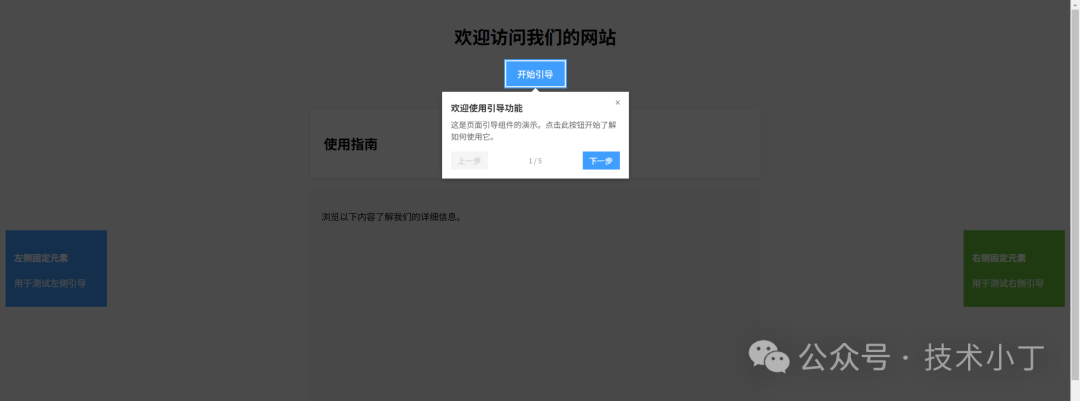
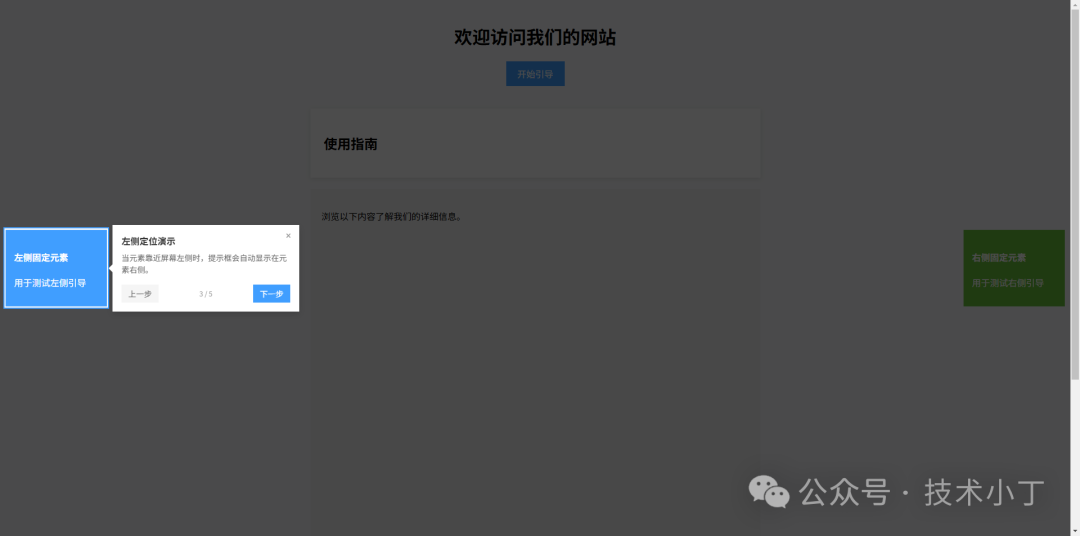
在现代 Web 应用中,新用户引导是提升用户体验的重要环节。通过页面引导功能,我们可以逐步向用户介绍界面功能,帮助他们快速熟悉应用操作。这种引导方式能够有效降低用户对操作系统的学习成本,提高产品接受度。本文将介绍如何使用 HTML、CSS 和 JavaScript 实现页面引导功能。效果演示
本系统通过高亮特定元素并在其旁边显示说明信息,引导用户逐步了解页面功能。当引导启动后,页面背景会变暗,目标元素被高亮显示,提示框显示当前步骤的说明文字。用户可以通过“上一步”、“下一步”按钮在引导步骤间切换,或者点击"完成"按钮结束引导。引导组件还会自动处理滚动,确保目标元素始终可见。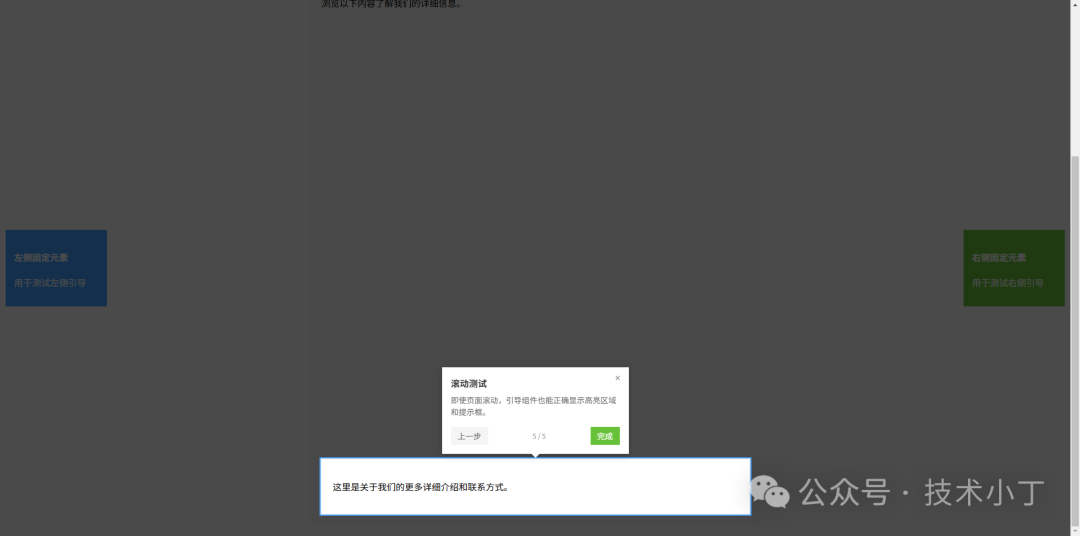
页面结构
页面主要包含以下区域:引导按钮、内容卡片、超出页面的元素区域和边缘元素区域。引导组件启动时会由 JavaScript 生成覆盖层、高亮区域和提示框。<button id="startGuide" class="btn">开始引导</button>
<div id="usageCard" class="card"> <h2>使用指南</h2></div>
<div class="extra-content"> <p>浏览以下内容了解我们的详细信息。</p> <div id="scrollTestElement" style="margin-top: 800px; padding: 20px; background: #fff;"> <p>这里是关于我们的更多详细介绍和联系方式。</p> </div></div>
<div class="edge-elements"> <div id="leftEdgeElement" style="position: fixed; left: 10px; top: 50%; transform: translateY(-50%); background: #409eff; color: white; padding: 15px; width: 150px;"> <h4>左侧固定元素</h4> <p>用于测试左侧引导</p> </div> <div id="rightEdgeElement" style="position: fixed; right: 10px; top: 50%; transform: translateY(-50%); background: #67c23a; color: white; padding: 15px; width: 150px;"> <h4>右侧固定元素</h4> <p>用于测试右侧引导</p> </div></div>
核心功能实现
系统通过创建 PageGuide 类来管理引导流程,包含步骤配置、当前步骤索引、组件激活状态等属性。构造函数接收步骤数组作为参数,每个步骤包含目标元素选择器、标题和内容。class PageGuide { constructor(steps) { this.steps = steps; this.currentStep = 0; this.isActive = false; this.highlight = null; this.tooltip = null; this.overlay = null; this.scrollHandler = null; this.scrollTimer = null; }}
创建引导元素
createElements 方法动态创建覆盖层、高亮区域和提示框元素,并将它们添加到文档体中。覆盖层用于遮罩整个页面,高亮区域突出显示目标元素,提示框显示引导内容。createElements() { this.overlay = document.createElement('div'); this.overlay.className = 'guide-overlay'; document.body.appendChild(this.overlay); this.highlight = document.createElement('div'); this.highlight.className = 'guide-highlight'; document.body.appendChild(this.highlight); this.tooltip = document.createElement('div'); this.tooltip.className = 'guide-tooltip'; document.body.appendChild(this.tooltip); this.scrollHandler = this.handleScroll.bind(this); window.addEventListener('scroll', this.scrollHandler, { passive: true });}
高亮区域定位
updateHighlightPosition 方法实现高亮区域的定位逻辑,通过计算目标元素的边界矩形,设置高亮框的位置和尺寸,确保与目标元素精确匹配。updateHighlightPosition() { const step = this.steps[this.currentStep]; const targetElement = document.querySelector(step.element); if (!targetElement) { console.warn(`Element ${step.element} not found`); return; } const rect = targetElement.getBoundingClientRect(); const scrollTop = window.scrollY || document.documentElement.scrollTop; const scrollLeft = window.scrollX || document.documentElement.scrollLeft; this.highlight.style.top = (rect.top + scrollTop - 4) + 'px'; this.highlight.style.left = (rect.left + scrollLeft - 4) + 'px'; this.highlight.style.width = (rect.width + 4) + 'px'; this.highlight.style.height = (rect.height + 4) + 'px';}
提示框定位
positionTooltip 方法根据目标元素位置智能计算提示框显示位置,自动选择最佳显示方向,并处理边界情况,避免提示框超出视窗。positionTooltip(targetElement) { const rect = targetElement.getBoundingClientRect(); const tooltipRect = this.tooltip.getBoundingClientRect(); const scrollTop = window.scrollY || document.documentElement.scrollTop; const scrollLeft = window.scrollX || document.documentElement.scrollLeft; const isFixed = window.getComputedStyle(targetElement).position === 'fixed'; const isNearLeft = rect.left < 50; const isNearRight = rect.right > window.innerWidth - 50; let top, left, arrowDir = ''; if (isNearLeft && rect.right + tooltipRect.width + 20 < window.innerWidth) { top = rect.top + scrollTop + (rect.height / 2) - (tooltipRect.height / 2); left = (isFixed ? rect.right : rect.right + scrollLeft) + 10; arrowDir = 'right'; } else if (isNearRight && rect.left - tooltipRect.width - 20 > 0) { top = rect.top + scrollTop + (rect.height / 2) - (tooltipRect.height / 2); left = (isFixed ? rect.left : rect.left + scrollLeft) - tooltipRect.width - 10; arrowDir = 'left'; } else { top = (isFixed ? rect.bottom : rect.bottom + scrollTop) + 10; left = (isFixed ? rect.left : rect.left + scrollLeft) + (rect.width / 2) - (tooltipRect.width / 2); arrowDir = 'bottom'; const maxPos = isFixed ? window.innerHeight : scrollTop + window.innerHeight; if (top + tooltipRect.height > maxPos) { top = (isFixed ? rect.top : rect.top + scrollTop) - tooltipRect.height - 10; arrowDir = 'top'; } } const isHorz = ['bottom', 'top'].includes(arrowDir); if (isHorz) left = Math.max(10, Math.min(left, window.innerWidth - tooltipRect.width - 10)); else top = Math.max(10, Math.min(top, window.innerHeight - tooltipRect.height - 10)); this.tooltip.style.top = top + 'px'; this.tooltip.style.left = left + 'px'; const arrow = this.tooltip.querySelector('#guideArrow'); arrow.className = 'guide-arrow'; arrow.classList.add(`guide-arrow-${arrowDir}`);}
扩展建议
完整代码
git地址:https://gitee.com/ironpro/hjdemo/blob/master/page-guide/index.html<!DOCTYPE html><html lang="zh-CN"><head> <meta charset="utf-8"> <meta name="viewport" content="width=device-width, initial-scale=1.0"> <title>页面引导组件</title> <style> body { margin: 0; padding: 20px; background: #f8f9fa; } .container { max-width: 800px; margin: 0 auto; } .header { text-align: center; margin-bottom: 40px; } .card { background: white; padding: 24px; margin-bottom: 20px; box-shadow: 0 2px 8px rgba(0, 0, 0, 0.1); } .btn { padding: 10px 20px; background: #409eff; color: white; border: none; cursor: pointer; font-size: 16px; } .btn:hover { background: #337ecc; } .extra-content { background: #f0f0f0; margin-top: 20px; padding: 20px; } .guide-overlay { position: fixed; top: 0; left: 0; width: 100%; height: 100%; background: transparent; z-index: 9999; pointer-events: auto; } .guide-highlight { position: absolute; border: 2px solid #409eff; box-shadow: 0 0 0 9999px rgba(0, 0, 0, 0.7); z-index: 10000; pointer-events: none; background: transparent; transition: all 0.3s ease; } .guide-tooltip { position: absolute; background: white; padding: 16px; box-shadow: 0 4px 14px rgba(0, 0, 0, 0.15); max-width: 300px; z-index: 10001; transition: all 0.3s ease; } .guide-tooltip-title { font-size: 16px; font-weight: 600; margin: 0 0 8px 0; color: #333; } .guide-tooltip-content { font-size: 14px; color: #666; line-height: 1.5; margin: 0 0 16px 0; } .guide-navigation { display: flex; align-items: center; justify-content: space-between; } .guide-btn { padding: 6px 14px; border: none; cursor: pointer; font-size: 14px; transition: background 0.2s; } .guide-btn-prev { background: #f5f5f5; color: #666; } .guide-btn-prev:hover { background: #e0e0e0; } .guide-btn-prev:disabled { background: #f5f5f5; color: #ccc; cursor: not-allowed; } .guide-btn-prev:disabled:hover { background: #f5f5f5; } .guide-btn-next { background: #409eff; color: white; } .guide-btn-next:hover { background: #337ecc; } .guide-btn-finish { background: #67c23a; color: white; } .guide-btn-finish:hover { background: #55a130; } .guide-progress { font-size: 14px; color: #999; text-align: center; margin: 0 10px; white-space: nowrap; } .guide-close { position: absolute; top: 8px; right: 8px; background: none; border: none; font-size: 18px; cursor: pointer; color: #999; } .guide-arrow { position: absolute; width: 0; height: 0; border-style: solid; border-width: 8px; z-index: 10002; } .guide-arrow-top { top: 100%; left: 50%; transform: translateX(-50%); margin-top: -1px; border-color: white transparent transparent transparent; border-top-width: 8px; border-bottom-width: 0; } .guide-arrow-bottom { bottom: 100%; left: 50%; transform: translateX(-50%); margin-bottom: -1px; border-color: transparent transparent white transparent; border-bottom-width: 8px; border-top-width: 0; } .guide-arrow-left { left: 100%; top: 50%; transform: translateY(-50%); margin-left: -1px; border-color: transparent transparent transparent white; border-left-width: 8px; border-right-width: 0; } .guide-arrow-right { right: 100%; top: 50%; transform: translateY(-50%); margin-right: -1px; border-color: transparent white transparent transparent; border-right-width: 8px; border-left-width: 0; } </style></head><body><div class="container"> <div class="header"> <h1>欢迎访问我们的网站</h1> <button id="startGuide" class="btn">开始引导</button> </div> <div id="usageCard" class="card"> <h2>使用指南</h2> </div> <div class="extra-content"> <p>浏览以下内容了解我们的详细信息。</p> <div id="scrollTestElement" style="margin-top: 800px; padding: 20px; background: #fff;"> <p>这里是关于我们的更多详细介绍和联系方式。</p> </div> </div> <div class="edge-elements"> <div id="leftEdgeElement" style="position: fixed; left: 10px; top: 50%; transform: translateY(-50%); background: #409eff; color: white; padding: 15px; width: 150px;"> <h4>左侧固定元素</h4> <p>用于测试左侧引导</p> </div> <div id="rightEdgeElement" style="position: fixed; right: 10px; top: 50%; transform: translateY(-50%); background: #67c23a; color: white; padding: 15px; width: 150px;"> <h4>右侧固定元素</h4> <p>用于测试右侧引导</p> </div> </div></div><script> class PageGuide { constructor(steps) { this.steps = steps; this.currentStep = 0; this.isActive = false; this.highlight = null; this.tooltip = null; this.overlay = null; this.scrollHandler = null; this.scrollTimer = null; } createElements() { this.overlay = document.createElement('div'); this.overlay.className = 'guide-overlay'; document.body.appendChild(this.overlay); this.highlight = document.createElement('div'); this.highlight.className = 'guide-highlight'; document.body.appendChild(this.highlight); this.tooltip = document.createElement('div'); this.tooltip.className = 'guide-tooltip'; document.body.appendChild(this.tooltip); this.scrollHandler = this.handleScroll.bind(this); window.addEventListener('scroll', this.scrollHandler, { passive: true }); } handleScroll() { if (this.isActive) { requestAnimationFrame(() => { this.updateHighlightPosition(); const step = this.steps[this.currentStep]; const targetElement = document.querySelector(step.element); if (targetElement) { this.positionTooltip(targetElement); } }); } } updateHighlightPosition() { const step = this.steps[this.currentStep]; const targetElement = document.querySelector(step.element); if (!targetElement) { console.warn(`Element ${step.element} not found`); return; } const rect = targetElement.getBoundingClientRect(); const scrollTop = window.scrollY || document.documentElement.scrollTop; const scrollLeft = window.scrollX || document.documentElement.scrollLeft; this.highlight.style.top = (rect.top + scrollTop - 4) + 'px'; this.highlight.style.left = (rect.left + scrollLeft - 4) + 'px'; this.highlight.style.width = (rect.width + 4) + 'px'; this.highlight.style.height = (rect.height + 4) + 'px'; } showStep(index) { if (index < 0 || index >= this.steps.length) return; this.currentStep = index; const step = this.steps[index]; const targetElement = document.querySelector(step.element); if (!targetElement) { console.warn(`Element ${step.element} not found`); return; } this.scrollToElement(targetElement); this.updateHighlightPosition(); this.tooltip.innerHTML = `<button class="guide-close">×</button> <div class="guide-arrow" id="guideArrow"></div> <h3 class="guide-tooltip-title" id="guideTitle">${step.title}</h3> <p class="guide-tooltip-content" id="guideContent">${step.content}</p> <div class="guide-navigation"> <button class="guide-btn guide-btn-prev" id="guidePrev" ${index === 0 ? 'disabled' : ''}>上一步</button> <div class="guide-progress">${index + 1} / ${this.steps.length}</div> ${index < this.steps.length - 1 ? '<button class="guide-btn guide-btn-next" id="guideNext">下一步</button>' : '<button class="guide-btn guide-btn-finish" id="guideFinish">完成</button>'} </div>`; this.positionTooltip(targetElement); this.bindEvents(); } positionTooltip(targetElement) { const rect = targetElement.getBoundingClientRect(); const tooltipRect = this.tooltip.getBoundingClientRect(); const scrollTop = window.scrollY || document.documentElement.scrollTop; const scrollLeft = window.scrollX || document.documentElement.scrollLeft; const isFixed = window.getComputedStyle(targetElement).position === 'fixed'; const isNearLeft = rect.left < 50; const isNearRight = rect.right > window.innerWidth - 50; let top, left, arrowDir = ''; if (isNearLeft && rect.right + tooltipRect.width + 20 < window.innerWidth) { top = rect.top + scrollTop + (rect.height / 2) - (tooltipRect.height / 2); left = (isFixed ? rect.right : rect.right + scrollLeft) + 10; arrowDir = 'right'; } else if (isNearRight && rect.left - tooltipRect.width - 20 > 0) { top = rect.top + scrollTop + (rect.height / 2) - (tooltipRect.height / 2); left = (isFixed ? rect.left : rect.left + scrollLeft) - tooltipRect.width - 10; arrowDir = 'left'; } else { top = (isFixed ? rect.bottom : rect.bottom + scrollTop) + 10; left = (isFixed ? rect.left : rect.left + scrollLeft) + (rect.width / 2) - (tooltipRect.width / 2); arrowDir = 'bottom'; const maxPos = isFixed ? window.innerHeight : scrollTop + window.innerHeight; if (top + tooltipRect.height > maxPos) { top = (isFixed ? rect.top : rect.top + scrollTop) - tooltipRect.height - 10; arrowDir = 'top'; } } const isHorz = ['bottom', 'top'].includes(arrowDir); if (isHorz) left = Math.max(10, Math.min(left, window.innerWidth - tooltipRect.width - 10)); else top = Math.max(10, Math.min(top, window.innerHeight - tooltipRect.height - 10)); this.tooltip.style.top = top + 'px'; this.tooltip.style.left = left + 'px'; const arrow = this.tooltip.querySelector('#guideArrow'); arrow.className = 'guide-arrow'; arrow.classList.add(`guide-arrow-${arrowDir}`); } scrollToElement(element) { const rect = element.getBoundingClientRect(); const computedStyle = window.getComputedStyle(element); const isFixed = computedStyle.position === 'fixed'; if (isFixed) { setTimeout(() => { this.updateHighlightPosition(); this.positionTooltip(element); }, 100); return; } const isVisible = ( rect.top >= 0 && rect.left >= 0 && rect.bottom <= (window.innerHeight || document.documentElement.clientHeight) && rect.right <= (window.innerWidth || document.documentElement.clientWidth) ); if (!isVisible) { const scrollTop = window.scrollY || document.documentElement.scrollTop; const elemTop = rect.top + scrollTop; const offsetTop = elemTop - (window.innerHeight / 2) + (rect.height / 2);
window.scrollTo({ top: offsetTop, behavior: 'smooth' }); setTimeout(() => { this.updateHighlightPosition(); this.positionTooltip(element); }, 500); } } bindEvents() { const prevBtn = this.tooltip.querySelector('#guidePrev'); if (prevBtn) { prevBtn.addEventListener('click', () => { if (!prevBtn.disabled) { this.showStep(this.currentStep - 1); } }); } const nextBtn = this.tooltip.querySelector('#guideNext'); if (nextBtn) { nextBtn.addEventListener('click', () => { this.showStep(this.currentStep + 1); }); } const finishBtn = this.tooltip.querySelector('#guideFinish'); if (finishBtn) { finishBtn.addEventListener('click', () => { this.finish(); }); } const closeBtn = this.tooltip.querySelector('.guide-close'); if (closeBtn) { closeBtn.addEventListener('click', () => { this.finish(); }); } } start() { if (this.isActive) return; this.isActive = true; this.createElements(); this.highlight.style.display = 'block'; this.tooltip.style.display = 'block'; this.showStep(0); } finish() { this.isActive = false; if (this.scrollHandler) { window.removeEventListener('scroll', this.scrollHandler); } if (this.scrollTimer) { clearTimeout(this.scrollTimer); } if (this.overlay) { document.body.removeChild(this.overlay); this.overlay = null; } if (this.highlight) { document.body.removeChild(this.highlight); this.highlight = null; } if (this.tooltip) { document.body.removeChild(this.tooltip); this.tooltip = null; } const scrollTop = window.scrollY || document.documentElement.scrollTop; if (scrollTop > 100) { window.scrollTo({top: 0, behavior: 'smooth'}); } } } document.addEventListener('DOMContentLoaded', function() { const guideSteps = [ {element: '#startGuide', title: '欢迎使用引导功能', content: '这是页面引导组件的演示。点击此按钮开始了解如何使用它。'}, {element: '#usageCard', title: '使用方法', content: '使用非常简单,只需要定义步骤配置并启动引导即可。'}, {element: '#leftEdgeElement', title: '左侧定位演示', content: '当元素靠近屏幕左侧时,提示框会自动显示在元素右侧。'}, {element: '#rightEdgeElement', title: '右侧定位演示', content: '当元素靠近屏幕右侧时,提示框会自动显示在元素左侧。'}, {element: '#scrollTestElement', title: '滚动测试', content: '即使页面滚动,引导组件也能正确显示高亮区域和提示框。'} ]; document.getElementById('startGuide').addEventListener('click', function() { new PageGuide(guideSteps).start(); }); });</script></body></html>
阅读原文:https://mp.weixin.qq.com/s/vJOE6E9okquyorf9JOe_Pw
该文章在 2025/12/26 14:34:04 编辑过




 400 186 1886