前端生成 PDF 不清晰?文字无法搜索选中编辑?体积太大?分页切割不精准?生成页数太少? dompdf.js V1.1.0 版本更新后,这些都不在是问题,只需要一行代码,就可以将 html 页面生成数千页 PDF 文件,这可能是前端首个实现这一功能的 js 库。
dompdf.js 是作者开源的前端 PDF 生成库。可以纯前端将 html 生成为非图片式的,可编辑,小体积的 PDF 文件。上一篇文章《一行代码实现纯前端 html 转矢量 pdf 的功能 》 有做相关介绍。之前的版本只能生成单页 PDF,很多开发者反馈有生成多页 PDF 的需求,作者花了点时间在 V1.1.0 版本新增了分页功能, 「可以将 html 页面生成为多页 PDF 文件」 。
代码示例
import dompdf from "dompdf.js" ;dompdf (document .querySelector ("#capture" ), { pagination : true }).then (function ( blob ) { });
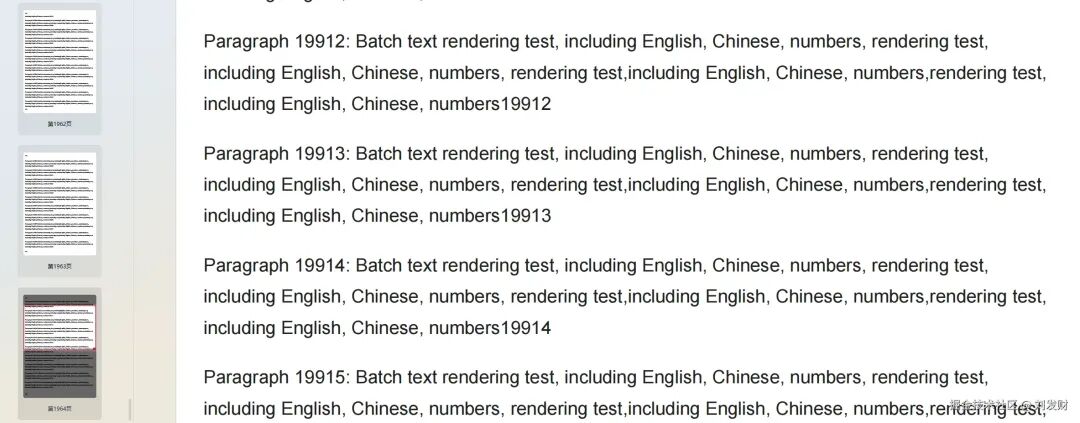
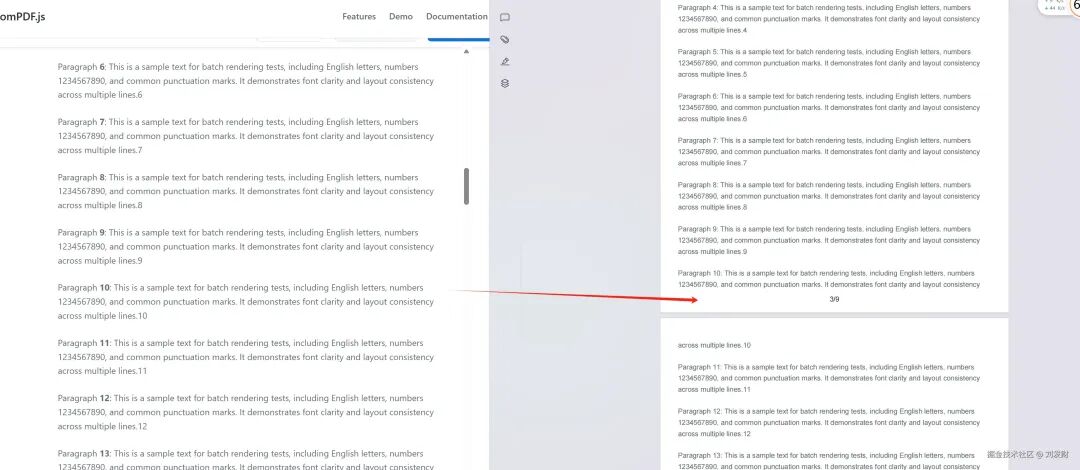
实现效果如下(数千页PDF):
「当然,生成数千页的 PDF 是非常极端的情况才能达成,决定能生成多少页 PDF 的,要看文件大小,如果是纯文字 PDF,就能生成更多的页数,反之如果 PDF 中有图片,生成的页数就会少」
1. 在线体验 ❝ https://dompdfjs.lisky.com.cn
❞ 2. Git 仓库地址 (欢迎 Star⭐⭐⭐) ❝ https://github.com/lmn1919/dompdf.js
❞ ❝ https://gitee.com/liu-facai/dompdf.js
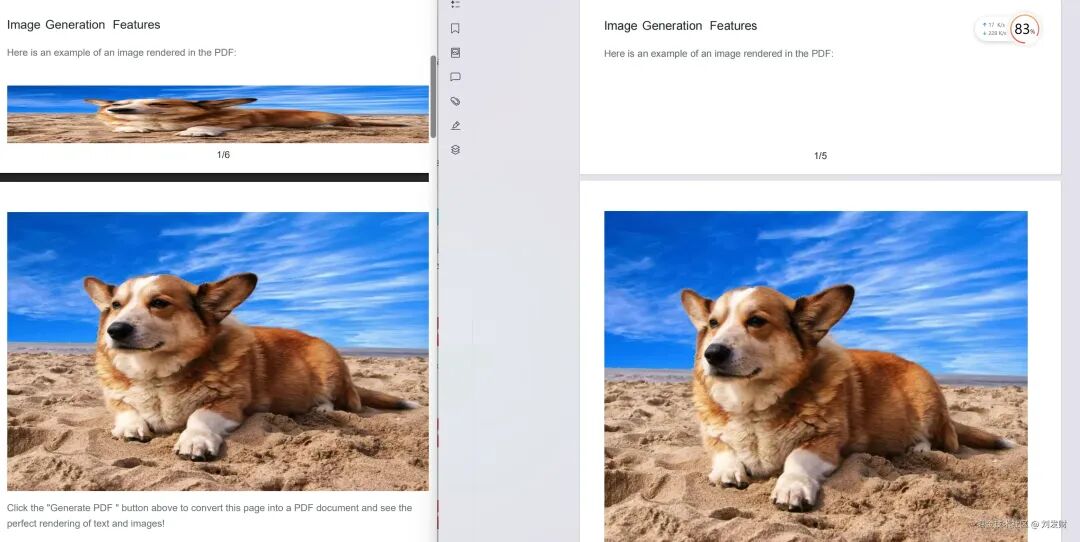
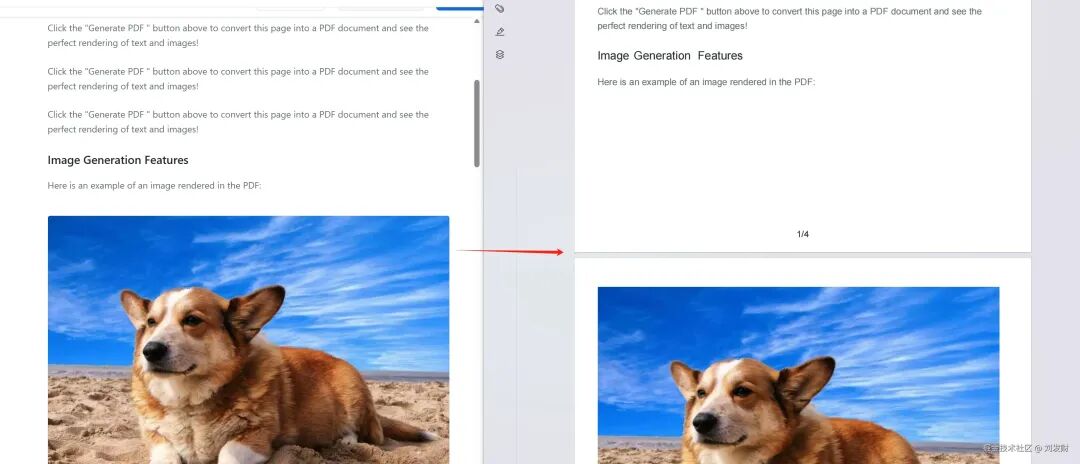
❞ 3.版本新功能特性 1. 分页功能-精准的页面分割 图片分页效果
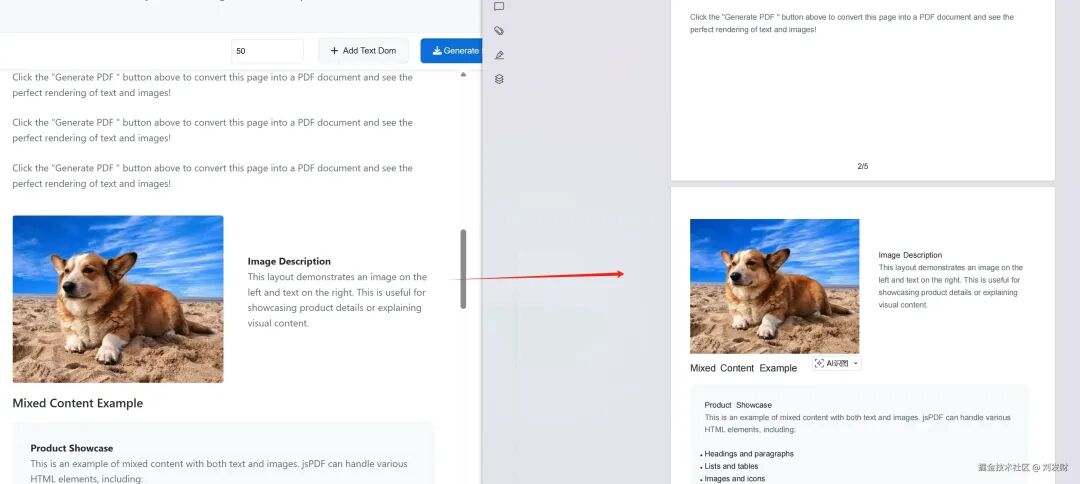
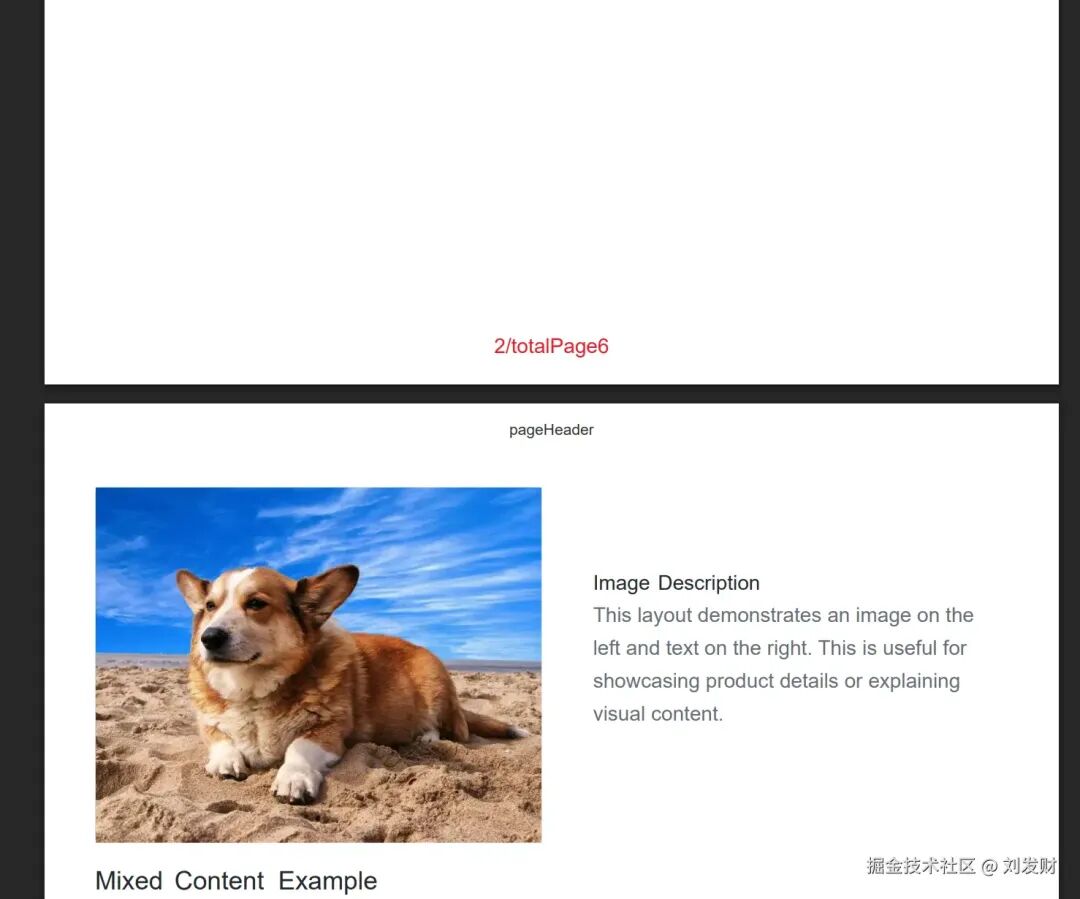
左右布局分页效果
文本分页效果
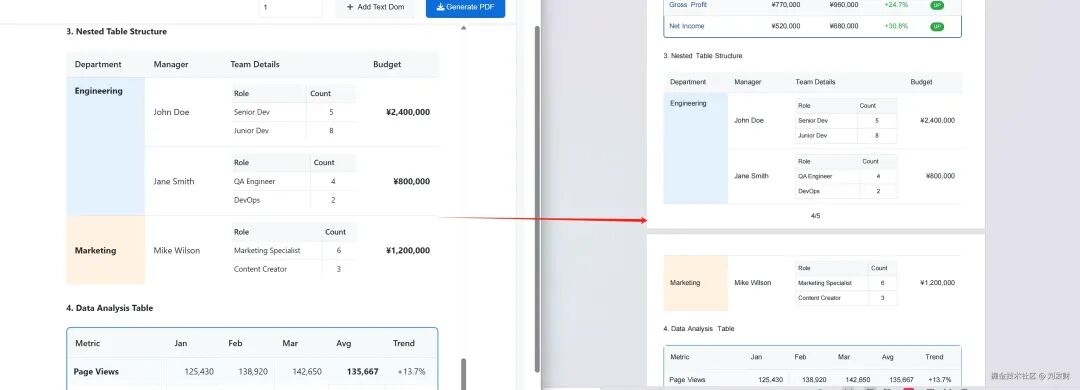
复杂表格分页效果
2. 自定义页眉页脚 可以设置页眉页脚的高度,内容,字体大小,字体颜色等。
3. PDF 密码、操作权限设置,PDF 压缩 4.分页实现原理 dompdf.js 是如何将 html 页面生成为多页 PDF 文件的?
先将 html 解析为 DOM 树。DOM 树主要包含 DOM 元素的位置信息(bounds: width|height|left|top)、样式数据、文本节点数据等。 大致的结构为:
{ bounds: {height : 1303.6875 , left: 8 , top: -298.5625 , width: 1273 }, elements: [ { bounds: {left : 8 , top: -298.5625 , width: 1273 , height: 1303.6875 }, elements: [ { bounds: {left : 8 , top: -298.5625 , width: 1273 , height: 1303.6875 }, elements: [ {styles: CSSParsedDeclaration, textNodes: Array (1 ), elements: Array (0 ), bounds: Bounds, flags: 0 }, {styles: CSSParsedDeclaration, textNodes: Array (1 ), elements: Array (0 ), bounds: Bounds, flags: 0 }, ... ], flags: 0 , styles: {backgroundClip: Array (1 ), backgroundColor: 0 , backgroundImage: Array (0 ), backgroundOrigin: Array (1 ), backgroundPosition: Array (1 ), …}, textNodes: [] } ], flags: 0 , styles: CSSParsedDeclaration {backgroundClip: Array (1 ), backgroundColor: 0 , backgroundImage: Array (0 ), backgroundOrigin: Array (1 ), backgroundPosition: Array (1 ), …}, textNodes: [] } ], flags: 4 , styles: CSSParsedDeclaration {backgroundClip: Array (1 ), backgroundColor: 0 , backgroundImage: Array (0 ), backgroundOrigin: Array (1 ), backgroundPosition: Array (1 ), …}, textNodes: [] } 递归 DOM 树的 elements 以及 textNodes,通过 bounds.top+bounds.height 判断是否需要分页,将 DOM 树按照页面分割成多个分页 DOM 树,并重新计算 elements 和 textNodes 的 bounds。 比如一个 textNodes 的位置信息是这样的:
{ bounds: {left : 8 , top: 1115 , width: 850 , height: 24 }, text : "这是一个文本节点" }
如果我们要按照 a4 纸张的高度(1123px)来分页,那么当文本节点的 top 加上 height 大于 1123px 时,而 top 的值 1115px 小于 1123px,那么这个文本节点就会分割到第二页。并且 top 值会重置为 0,后续项的 top 值也会减少相应的值,确保元素位置的准确性。
循环 DOM 树分页数组,调用 jspdf.addPage() 方法添加新页面,并绘制页眉页脚。根据不同的元素类型,以及元素的位置信息,调用不同的 jspdf 方法生成 pdf。 比如绘制文字:
jspdf .text("这是一个文本节点" , 1115 , 8 );绘制图片:
jspdf.image (img , x , y , width , height ); 5.使用文档 安装:
npm install dompdf.js --save
CDN 引入:
< script src = "https://cdn.jsdelivr.net/npm/dompdf.js@latest/dist/dompdf.js" ></ script >
基础用法
import dompdf from "dompdf.js" ;dompdf (document .querySelector ("#capture" ), options) .then (( blob ) => { const url = URL .createObjectURL (blob); const a = document .createElement ("a" ); a.href = url; a.download = "example.pdf" ; document .body .appendChild (a); a.click (); }) .catch (( err ) => { console .error (err); });
PDF 分页渲染 默认情况下,dompdf 会将整个文档渲染到单页中。
您可以通过设置 pagination 选项为 true 来开启分页渲染。通过 pageConfig 字段自定义页眉页脚的尺寸,内容,字体颜色/大小,位置等信息。
「非常重要!!!!非常重要!!!!非常重要!!!!非常重要!!!!非常重要!!!!」
「需要将要生成PDF的dom节点设置为对应的页面宽度(px),比如a4要设置宽度为794px,这里是页面尺寸对照表,请点击查看 https://dompdfjs.lisky.com.cn/documentation.html 」
<div id ="capture" style="width:794px" > </div> import dompdf from "dompdf.js" ; dompdf (document.querySelector ("#capture" ), { pagination : true , format : "a4" , pageConfig : { header : { content : "这是页眉" , height : 50 , contentColor : "#333333" , contentFontSize : 12 , contentPosition : "center" , padding : [0 , 0 , 0 , 0 ], }, footer : { content : "第${currentPage}页/共${totalPages}页" , height : 50 , contentColor : "#333333" , contentFontSize : 12 , contentPosition : "center" , padding : [0 , 0 , 0 , 0 ], }, }, }) .then ((blob) => { const url = URL.createObjectURL (blob); const a = document.createElement ("a" ); a.href = url; a.download = "example.pdf" ; document.body.appendChild (a); a.click (); }) .catch ((err) => { console.error (err); });
更精准的分页控制- divisionDisable 属性 如果您不希望某个容器在分页时被拆分时,为该元素添加 divisionDisable 属性,跨页时它会整体移至下一页。
< img src ="" alt ="PDF Generation Example" crossorigin ="anonymous" divisionDisable />
右边为使用divisionDisable属性的效果
options 参数 useCORSfalsebooleanbackgroundColorstring \| nullfontConfigobjectencryptionobjectPDF 加密配置,属性 userPassword 用于给定权限列表下用户的密码;属性 ownerPassword 需要设置 userPassword 和 ownerPassword 以进行正确的身份验证;属性 userPermissions 用于指定用户权限,可选值为 ['print', 'modify', 'copy', 'annot-forms']precision16numbercompressfalsebooleanputOnlyUsedFontsfalsebooleanpaginationfalsebooleanformat'a4'string页面规格,支持 a0–a10、 b0–b10、 c0–c10、 letter 等 pageConfigobject
content页眉默认值为空,页脚默认值为 ${currentPage}/${totalPages}string文本内容,支持 ${currentPage}、 ${totalPages}, ${currentPage}为当前页码, ${totalPages}为总页码 height50numbercontentPosition'center'string \| [number, number]文本位置枚举 center、 centerLeft 、 centerRight、 centerTop、 centerBottom、 leftTop、 leftBottom、 rightTop、 rightBottom或坐标 [x,y]contentColor'#333333 'stringcontentFontSize16numberpadding[0,24,0,24][number, number, number, number]
字体配置(# fontConfig)字段: fontFamily''stringfontBase64''string.ttf
乱码问题-字体导入支持 由于 jspdf 只支持英文,所以其他语言会出现乱码的问题,需要导入对应的字体文件来解决,如果需要自定义字体,在这里将字体 tff 文件转化成 base64 格式的 js 文件,中文字体推荐使用思源黑体,体积较小。 在代码中引入该文件即可。
< script type = "text/javascript" src = "./SourceHanSansSC-Normal-Min-normal.js" ></ script > < script > dompdf (document .querySelector ('#capture' ), { useCORS : true , fontConfig : { fontFamily : 'SourceHanSansSC-Normal-Min' , fontBase64 : window .fontBase64 } }) .then (function (blob ) { const url = URL .createObjectURL (blob); const a = document .createElement ('a' ); a.href = url; a.download = 'example.pdf' ; document .body .appendChild (a); a.click (); }) .catch (function (err ) { console .error (err); }); </ script >
绘制渐变色、阴影等复杂样式-foreignObjectRendering 使用 在 dom 十分复杂,或者 pdf 无法绘制的情况(比如:复杂的表格,边框阴影,渐变等),可以考虑使用 foreignObjectRendering。 给要渲染的元素添加 foreignObjectRendering 属性,就可以通过 svg 的 foreignObject 将它渲染成一张背景图插入到 pdf 文件中。
但是,由于 foreignObject 元素的渲染依赖于浏览器的实现,因此在不同的浏览器中可能会有不同的表现。 所以,在使用 foreignObjectRendering 时,需要注意以下事项:
foreignObject 元素的渲染依赖于浏览器的实现,因此在不同的浏览器中可能会有不同的表现。 IE 浏览器完全不支持,推荐在 chrome 和 firefox,edge 中使用。 示例
< div style = "width: 100px;height: 100px;" foreignObjectRendering > < div style ="width: 50px;height: 50px;border: 1px solid #000;box-shadow: 2px 2px 5px rgba(0,0,0,0.3);background: linear-gradient(45deg, #ff6b6b, #4ecdc4);" > 这是一个div元素 </ div > </ div >
浏览器兼容性 该库应该可以在以下浏览器上正常工作(需要 Promise polyfill):
阅读原文:https://mp.weixin.qq.com/s/Zk4DqM5dV1UtIHKAQO9gwg






 400 186 1886