消息提示作为现代 Web 应用中一种重要的反馈机制,能够有效地向用户传达操作结果、系统状态等信息。本文将介绍如何使用原生 HTML、CSS 和 JavaScript 实现一套功能完善的消息提示组件。效果演示
该消息提示组件提供了四种基本类型的消息提示:信息、成功、警告和错误。每种类型都有独特的图标和颜色标识,帮助用户快速识别消息性质。此外,还支持常驻型通知,即不自动关闭、需用户手动关闭的特殊提示。用户可以通过点击页面中的按钮触发各类通知,在右上角区域以动画形式弹出,并在设定的时间后自动消失。每个通知都包含标题、内容、时间和进度条,同时配有关闭按钮方便用户随时取消显示。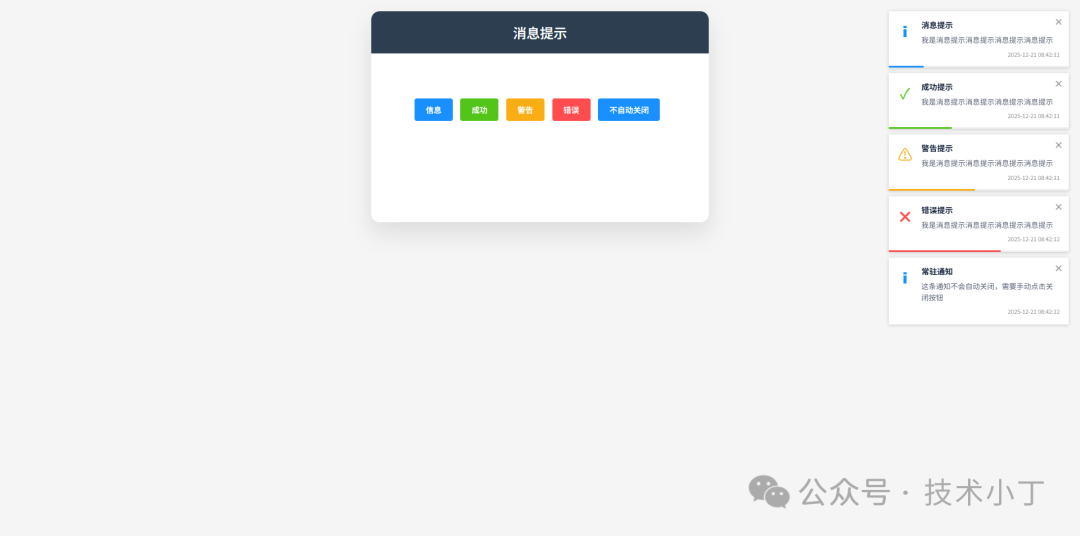
页面结构
消息容器
整个通知系统的根节点是一个固定定位的容器 #notification-container,这个容器由 JavaScript 创建,并通过 CSS 设置为 position: fixed,确保始终处于视窗右上角,不影响主内容流。
单个通知组件
每个通知都是一个独立的 .notice 元素,包含图标、标题、内容、时间、关闭按钮和进度条轨道等元素。渲染后的基本结构如下:<div class="notice notice-info" id="notice-1"> <div class="notice-container"> <div class="notice-icon"></div> <div class="notice-content-wrapper"> <div class="notice-title">消息提示</div> <div class="notice-content">我是消息提示消息提示消息提示消息提示</div> <div class="notice-time">2025-12-21 08:40:10</div> </div> </div> <div class="notice-close-button" data-id="1"></div> <div class="notice-progress"> <div class="notice-progress-bar" id="progress-1" style="width: 100%;"></div> </div></div>
核心功能实现
为了统一管理和复用通知逻辑,项目采用了模块模式封装了一个名为 NoticeManager 的单例对象。它负责创建、更新及销毁通知实例,并维护全局状态。
初始化容器
该对象首先创建并挂载通知容器到文档中,然后定义私有变量存储所有活跃通知。const container = document.createElement('div');container.id = 'notification-container';document.body.appendChild(container);
const notices = new Map();
创建通知流程
当调用任意一种类型的方法时(如 NoticeManager.info()),实际执行的是通用的 createNotice(options) 函数。该函数分配唯一 ID 并构建 DOM 结构,插入至通知容器,绑定关闭事件处理器,若启用了自动关闭,则启动倒计时和进度条动画,最后返回分配的 ID 供后续操作引用。function createNotice(options) { const id = ++noticeId; const type = options.type || 'info'; const title = options.title || ''; const message = options.message || ''; const timeout = options.timeout || 3000; const autoClose = options.autoClose !== false; const noticeEl = document.createElement('div'); noticeEl.className = `notice notice-${type}`; noticeEl.id = `notice-${id}`; noticeEl.innerHTML = `<div class="notice-container"> <div class="notice-icon"></div> <div class="notice-content-wrapper"> ${title ? `<div class="notice-title">${title}</div>` : ''} <div class="notice-content">${message}</div> <div class="notice-time">${getCurrentTime()}</div> </div> </div> <div class="notice-close-button" data-id="${id}"></div> ${autoClose ? `<div class="notice-progress"> <div class="notice-progress-bar" id="progress-${id}"></div> </div>` : ''}`; container.appendChild(noticeEl); const closeBtn = noticeEl.querySelector('.notice-close-button'); closeBtn.addEventListener('click', () => destroyNotice(id)); const noticeInstance = { id: id, element: noticeEl, startTime: Date.now(), timeout: timeout, autoClose: autoClose, timer: null, destroyed: false }; notices.set(id, noticeInstance); if (autoClose) { const progressBar = document.getElementById(`progress-${id}`); if (progressBar) { progressBar.style.width = '100%'; } updateProgressBar(id); noticeInstance.timer = setTimeout(() => destroyNotice(id), timeout); } return id;}
自动关闭机制
对于设置了 autoClose: true 的通知,会在创建完成后立即开始倒计时,并同步驱动进度条从 100% 缓慢减少至 0%,最终触发销毁动作。function updateProgressBar(id) { const notice = notices.get(id); if (!notice || notice.destroyed || !notice.autoClose) return;
const elapsed = Date.now() - notice.startTime; const progress = Math.max(0, 100 - (elapsed / notice.timeout) * 100); const progressBar = document.getElementById(`progress-${id}`); if (progressBar) { progressBar.style.width = `${progress}%`; } if (progress > 0) { requestAnimationFrame(() => updateProgressBar(id)); }}
销毁通知处理
无论是超时还是用户主动点击关闭按钮,都会进入 destroyNotice(id) 流程进行清理工作。function destroyNotice(id) { const notice = notices.get(id); if (!notice || notice.destroyed) return; if (notice.timer) { clearTimeout(notice.timer); } notice.destroyed = true; notices.delete(id); const noticeEl = document.getElementById(`notice-${id}`); if (noticeEl) { noticeEl.classList.add('slideOutRight'); setTimeout(() => { if (noticeEl.parentNode) { noticeEl.parentNode.removeChild(noticeEl); } }, 300); }}
扩展建议
完整代码
git地址:https://gitee.com/ironpro/hjdemo/blob/master/notice/index.html<!DOCTYPE html><html lang="zh-CN"><head> <meta charset="utf-8"> <meta name="viewport" content="width=device-width, initial-scale=1.0"> <title>消息提示</title> <style> * { margin: 0; padding: 0; box-sizing: border-box; } body { background-color: #f5f5f5; min-height: 100vh; padding: 20px; } .container { max-width: 600px; margin: 0 auto; background: white; border-radius: 15px; box-shadow: 0 20px 40px rgba(0,0,0,0.1); overflow: hidden; } .header { background: #2c3e50; color: white; padding: 20px; text-align: center; } .header h1 { font-size: 24px; font-weight: 500; } .main { padding: 20px; text-align: center; height: 300px; } .buttons { margin-top: 60px; } .notice-button { padding: 10px 20px; border: none; border-radius: 4px; cursor: pointer; font-size: 14px; font-weight: 500; transition: all 0.2s; color: white; margin-right: 10px; margin-bottom: 10px; background: var(--color-info); } .notice-button.success { background: var(--color-success); } .notice-button.error { background: var(--color-error); } .notice-button.warning { background: var(--color-warning); } .notice-button.info { background: var(--color-info); }
:root { --color-info: #1890ff; --color-success: #52c41a; --color-warning: #faad14; --color-error: #ff4d4f; } #notification-container { position: fixed; top: 20px; right: 20px; z-index: 9999; } .notice { position: relative; margin-bottom: 10px; padding: 16px; box-shadow: 0 1px 6px rgba(0,0,0,0.2); background: #fff; width: 320px; animation: fadeInRight 0.3s; transition: transform 0.3s, opacity 0.3s; overflow: hidden; } @keyframes fadeInRight { from { opacity: 0; transform: translate3d(100%, 0, 0); } to { opacity: 1; transform: translate3d(0, 0, 0); } } .slideOutRight { animation: slideOutRight 0.3s forwards; } @keyframes slideOutRight { from { opacity: 1; transform: translate3d(0, 0, 0); } to { opacity: 0; transform: translate3d(100%, 0, 0); } } .notice-close-button { position: absolute; top: 10px; right: 10px; width: 16px; height: 16px; border-radius: 50%; cursor: pointer; display: flex; align-items: center; justify-content: center; } .notice-close-button:hover { background-color: #e81123; } .notice-close-button::before { content: "×"; color: #999; font-weight: bold; font-size: 16px; } .notice-close-button:hover::before { color: #fff; } .notice-container { display: flex; align-items: flex-start; } .notice-icon { width: 26px; text-align: center; margin-right: 16px; flex-shrink: 0; } .notice-icon::before { font-size: 26px; display: block; } .notice-info .notice-icon::before { content: "ℹ"; color: var(--color-info);; } .notice-success .notice-icon::before { content: "✓"; color: var(--color-success);; } .notice-warning .notice-icon::before { content: "⚠"; color: var(--color-warning);; } .notice-error .notice-icon::before { content: "✖"; color: var(--color-error);; } .notice-content-wrapper { flex: 1; min-width: 0; } .notice-title { font-weight: 700; margin-bottom: 8px; font-size: 14px; line-height: 17px; color: #17233d; white-space: nowrap; overflow: hidden; text-overflow: ellipsis; } .notice-content { font-size: 13px; color: #515a6e; line-height: 1.5; margin-bottom: 8px; } .notice-time { font-size: 10px; color: #999; text-align: right; } .notice-progress { position: absolute; left: 0; bottom: 0; height: 3px; width: 100%; background-color: #f0f0f0; } .notice-progress-bar { height: 100%; width: 0%; transition: width 0.1s linear; } .notice-info .notice-progress-bar { background-color: var(--color-info); } .notice-success .notice-progress-bar { background-color: var(--color-success); } .notice-warning .notice-progress-bar { background-color: var(--color-warning); } .notice-error .notice-progress-bar { background-color: var(--color-error); } </style></head><body><div class="container"> <div class="header"> <h1>消息提示</h1> </div> <div class="main"> <div class="buttons"> <button class="notice-button info" id="notice1">信息</button> <button class="notice-button success" id="notice2">成功</button> <button class="notice-button warning" id="notice3">警告</button> <button class="notice-button error" id="notice4">错误</button> <button class="notice-button info" id="notice5">不自动关闭</button> </div> </div></div><script> const NoticeManager = (function() { const container = document.createElement('div'); container.id = 'notification-container'; document.body.appendChild(container);
let noticeId = 0; const notices = new Map(); function createNotice(options) { const id = ++noticeId; const type = options.type || 'info'; const title = options.title || ''; const message = options.message || ''; const timeout = options.timeout || 3000; const autoClose = options.autoClose !== false; const noticeEl = document.createElement('div'); noticeEl.className = `notice notice-${type}`; noticeEl.id = `notice-${id}`; noticeEl.innerHTML = `<div class="notice-container"> <div class="notice-icon"></div> <div class="notice-content-wrapper"> ${title ? `<div class="notice-title">${title}</div>` : ''} <div class="notice-content">${message}</div> <div class="notice-time">${getCurrentTime()}</div> </div> </div> <div class="notice-close-button" data-id="${id}"></div> ${autoClose ? `<div class="notice-progress"> <div class="notice-progress-bar" id="progress-${id}"></div> </div>` : ''}`; container.appendChild(noticeEl); const closeBtn = noticeEl.querySelector('.notice-close-button'); closeBtn.addEventListener('click', () => destroyNotice(id)); const noticeInstance = { id: id, element: noticeEl, startTime: Date.now(), timeout: timeout, autoClose: autoClose, timer: null, destroyed: false }; notices.set(id, noticeInstance); if (autoClose) { const progressBar = document.getElementById(`progress-${id}`); if (progressBar) { progressBar.style.width = '100%'; } updateProgressBar(id); noticeInstance.timer = setTimeout(() => destroyNotice(id), timeout); } return id; } function updateProgressBar(id) { const notice = notices.get(id); if (!notice || notice.destroyed || !notice.autoClose) return;
const elapsed = Date.now() - notice.startTime; const progress = Math.max(0, 100 - (elapsed / notice.timeout) * 100); const progressBar = document.getElementById(`progress-${id}`); if (progressBar) { progressBar.style.width = `${progress}%`; } if (progress > 0) { requestAnimationFrame(() => updateProgressBar(id)); } } function destroyNotice(id) { const notice = notices.get(id); if (!notice || notice.destroyed) return; if (notice.timer) { clearTimeout(notice.timer); } notice.destroyed = true; notices.delete(id); const noticeEl = document.getElementById(`notice-${id}`); if (noticeEl) { noticeEl.classList.add('slideOutRight'); setTimeout(() => { if (noticeEl.parentNode) { noticeEl.parentNode.removeChild(noticeEl); } }, 300); } } function getCurrentTime() { const now = new Date(); const year = now.getFullYear(); const month = String(now.getMonth() + 1).padStart(2, '0'); const day = String(now.getDate()).padStart(2, '0'); const hours = String(now.getHours()).padStart(2, '0'); const minutes = String(now.getMinutes()).padStart(2, '0'); const seconds = String(now.getSeconds()).padStart(2, '0'); return `${year}-${month}-${day} ${hours}:${minutes}:${seconds}`; } return { info: (options) => createNotice({...options, type: 'info'}), success: (options) => createNotice({...options, type: 'success'}), warning: (options) => createNotice({...options, type: 'warning'}), error: (options) => createNotice({...options, type: 'error'}) }; })();
document.getElementById('notice1').addEventListener('click', () => { NoticeManager.info({ title: '消息提示', message: '我是消息提示消息提示消息提示消息提示' }); });
document.getElementById('notice2').addEventListener('click', () => { NoticeManager.success({ title: '成功提示', message: '我是消息提示消息提示消息提示消息提示' }); });
document.getElementById('notice3').addEventListener('click', () => { NoticeManager.warning({ title: '警告提示', message: '我是消息提示消息提示消息提示消息提示' }); });
document.getElementById('notice4').addEventListener('click', () => { NoticeManager.error({ title: '错误提示', message: '我是消息提示消息提示消息提示消息提示' }); });
document.getElementById('notice5').addEventListener('click', () => { NoticeManager.info({ title: '常驻通知', message: '这条通知不会自动关闭,需要手动点击关闭按钮', autoClose: false }); });</script></body></html>
阅读原文:原文链接
该文章在 2025/12/22 18:04:05 编辑过




 400 186 1886