在现代Web应用中,用户界面的设计直接影响着用户的体验质量。当下拉选择框的数据量较大时,传统的滚动条方式不仅效率低下,而且难以快速定位目标选项。为此,我们需要一款带有分页功能的下拉选择器组件,它不仅能有效管理大量选项,还能提供流畅的搜索体验。本文将详细介绍如何使用 HTML、CSS 和 JavaScript 实现分页下拉选择器。效果演示
这个组件集成了多项实用功能:包括选项搜索、分页导航、高亮选项等特性,适用于需要处理大量选项的选择场景。用户通过点击选择框打开面板,然后可通过搜索框筛选选项,利用分页按钮浏览不同页面的内容,最终点击所需选项完成选择。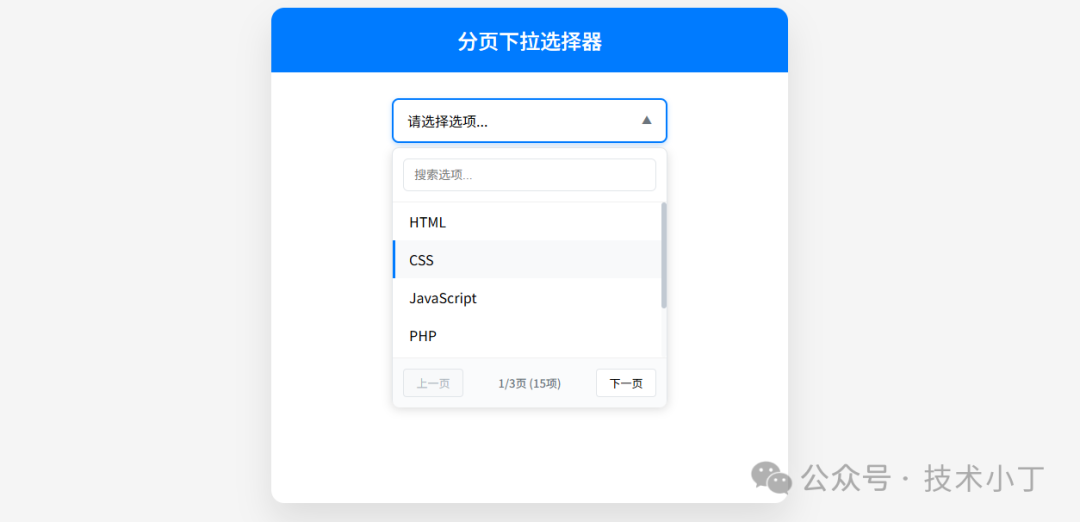
页面结构
选择框
选择框显示当前选中值,默认为“请选择选项...”占位。<div class="select-header" id="selectHeader"> <span id="selectedText">请选择选项...</span></div>
下拉面板
<div class="select-panel" id="selectPanel"> <div class="search"> <input type="text" id="searchInput" placeholder="搜索选项..."> </div> <div class="options" id="options"></div> <div class="pagination"> <button id="prevBtn">上一页</button> <span class="pagination-info" id="pageInfo">1/1页 (0项)</span> <button id="nextBtn">下一页</button> </div></div>
核心功能实现
事件绑定机制
通过 bindEvents() 方法统一注册各类交互事件,其中使用了防抖(debounce)技术优化搜索性能,避免频繁触发过滤操作。function bindEvents() { selectHeader.addEventListener('click', togglePanel); document.addEventListener('click', (e) => { if (!selectContainer.contains(e.target)) hidePanel(); }); searchInput.addEventListener('input', debounce(filterOptions, 300)); prevBtn.addEventListener('click', () => goToPage(state.currentPage - 1)); nextBtn.addEventListener('click', () => goToPage(state.currentPage + 1));}
选项渲染
renderOptions() 函数负责根据当前页码计算应显示的选项范围,并动态创建DOM节点展示这些选项。function renderOptions() { optionsEl.innerHTML = ''; if (state.filteredOptions.length === 0) { optionsEl.innerHTML = '<div class="no-results">未找到匹配的选项</div>'; return; } var start = (state.currentPage - 1) * state.pageSize; var end = start + state.pageSize; var pageOptions = state.filteredOptions.slice(start, end); pageOptions.forEach(option => { var el = document.createElement('div'); el.className = 'option'; el.textContent = option.text; if (state.selectedOption?.value === option.value) { el.classList.add('selected'); } el.addEventListener('click', () => selectOption(option)); optionsEl.appendChild(el); });}
分页更新
每当选项发生变化时都会调用 updatePagination() 函数来刷新分页信息,同时控制前后页按钮的可用状态。function updatePagination() { var total = state.filteredOptions.length; var totalPages = Math.ceil(total / state.pageSize) || 1; pageInfo.textContent = `${state.currentPage}/${totalPages}页 (${total}项)`; prevBtn.disabled = state.currentPage <= 1; nextBtn.disabled = state.currentPage >= totalPages || totalPages === 0;}
搜索过滤功能
搜索过程模拟了网络延迟效果,用户输入关键字后自动触发过滤逻辑,重置到第一页并更新视图。async function filterOptions(e) { var searchTerm = e.target.value; setLoading(true); try { await new Promise(resolve => setTimeout(resolve, 200)); state.filteredOptions = searchTerm ? state.allOptions.filter(opt => opt.text.toLowerCase().includes(searchTerm.toLowerCase())) : [...state.allOptions]; state.currentPage = 1; } finally { setLoading(false); renderOptions(); updatePagination(); }}
扩展建议
远程数据加载:支持从服务器获取选项数据
键盘导航支持:添加方向键切换选项功能,回车键确认选择操作
多选模式:提供复选框形式允许多个选项被选中,显示已选项目计数和标签
自定义模板:允许用户自定义选项显示模板,支持图标、描述等丰富内容
完整代码
git地址:https://gitee.com/ironpro/hjdemo/blob/master/select-paginate/index.html<!DOCTYPE html><html lang="zh-CN"><head> <meta charset="utf-8"> <meta name="viewport" content="width=device-width, initial-scale=1.0"> <title>分页下拉选择器</title> <style> * { margin: 0; padding: 0; box-sizing: border-box; } body { background: #f5f5f5; min-height: 100vh; padding: 20px; } .container { max-width: 600px; margin: 0 auto; background: white; border-radius: 15px; box-shadow: 0 20px 40px rgba(0,0,0,0.1); overflow: hidden; } .header { background: #007bff; color: white; padding: 20px; text-align: center; } .header h1 { font-size: 24px; font-weight: 500; } .main { padding: 30px; min-height: 500px; } .select-container { position: relative; width: 100%; max-width: 320px; margin: 0 auto; } .select-header { padding: 14px 16px; border: 2px solid #e1e5e9; background-color: #ffffff; cursor: pointer; display: flex; justify-content: space-between; align-items: center; border-radius: 8px; transition: all 0.3s ease; box-shadow: 0 1px 3px rgba(0, 0, 0, 0.05); } .select-header:hover { border-color: #007bff; box-shadow: 0 2px 6px rgba(0, 123, 255, 0.15); } .select-header.active { border-color: #007bff; box-shadow: 0 2px 6px rgba(0, 123, 255, 0.25); } .select-header::after { content: "▼"; font-size: 14px; color: #6c757d; transition: transform 0.3s ease; } .select-header.active::after { transform: rotate(180deg); } .select-panel { position: absolute; top: 100%; left: 0; right: 0; border: 1px solid #e1e5e9; background-color: #fff; z-index: 1000; max-height: 300px; box-shadow: 0 4px 14px rgba(0, 0, 0, 0.15); border-radius: 8px; margin-top: 5px; opacity: 0; visibility: hidden; transform: translateY(-10px); transition: all 0.3s ease; } .select-panel.show { opacity: 1; visibility: visible; transform: translateY(0); } .search { padding: 14px; border-bottom: 1px solid #f0f0f0; } .search input { box-sizing: border-box; width: 100%; padding: 10px 14px; border: 1px solid #e1e5e9; border-radius: 6px; font-size: 14px; transition: border-color 0.3s ease, box-shadow 0.3s ease; } .search input:focus { outline: none; border-color: #007bff; box-shadow: 0 0 0 3px rgba(0, 123, 255, 0.1); } .options { max-height: 180px; overflow-y: auto; } .options::-webkit-scrollbar { width: 6px; } .options::-webkit-scrollbar-track { background: #f8f9fa; border-radius: 3px; } .options::-webkit-scrollbar-thumb { background: #c1c9d2; border-radius: 3px; } .options::-webkit-scrollbar-thumb:hover { background: #a6b1bb; } .option { padding: 10px 16px; cursor: pointer; transition: background-color 0.2s ease; border-left: 3px solid transparent; } .option:hover { background-color: #f8f9fa; border-left-color: #007bff; } .option.selected { background-color: #e7f3ff; border-left-color: #007bff; color: #004085; font-weight: 500; } .pagination { display: flex; justify-content: space-between; align-items: center; padding: 14px; border-top: 1px solid #f0f0f0; background-color: #fafbfc; border-radius: 0 0 8px 8px; } .pagination button { background: #ffffff; border: 1px solid #e1e5e9; cursor: pointer; padding: 6px 14px; border-radius: 4px; font-size: 13px; transition: all 0.2s ease; min-width: 70px; } .pagination button:hover:not(:disabled) { background-color: #007bff; color: white; border-color: #007bff; } .pagination button:disabled { color: #adb5bd; cursor: not-allowed; background-color: #f8f9fa; } .pagination-info { color: #6c757d; font-size: 13px; font-weight: 500; } .no-results { padding: 20px; text-align: center; color: #6c757d; font-style: italic; } .loading { padding: 20px; text-align: center; color: #6c757d; } .loading::after { content: ""; display: inline-block; width: 20px; height: 20px; border: 2px solid #e1e5e9; border-top: 2px solid #007bff; border-radius: 50%; animation: spin 1s linear infinite; margin-left: 10px; vertical-align: middle; } @keyframes spin { 0% { transform: rotate(0deg); } 100% { transform: rotate(360deg); } } </style></head><body><div class="container"> <div class="header"> <h1>分页下拉选择器</h1> </div> <div class="main"> <div class="select-container" id="selectContainer"> <div class="select-header" id="selectHeader"> <span id="selectedText">请选择选项...</span> </div> <div class="select-panel" id="selectPanel"> <div class="search"> <input type="text" id="searchInput" placeholder="搜索选项..."> </div> <div class="options" id="options"></div> <div class="pagination"> <button id="prevBtn">上一页</button> <span class="pagination-info" id="pageInfo">1/1页 (0项)</span> <button id="nextBtn">下一页</button> </div> </div> </div> </div></div>
<script> var selectContainer = document.getElementById('selectContainer'); var selectHeader = document.getElementById('selectHeader'); var selectPanel = document.getElementById('selectPanel'); var optionsEl = document.getElementById('options'); var searchInput = document.getElementById('searchInput'); var prevBtn = document.getElementById('prevBtn'); var nextBtn = document.getElementById('nextBtn'); var pageInfo = document.getElementById('pageInfo'); var selectedText = document.getElementById('selectedText');
var state = { allOptions: [], filteredOptions: [], selectedOption: null, currentPage: 1, pageSize: 6 };
function init(options = []) { state.allOptions = options; state.filteredOptions = [...options]; bindEvents(); renderOptions(); updatePagination(); }
function bindEvents() { selectHeader.addEventListener('click', togglePanel); document.addEventListener('click', (e) => { if (!selectContainer.contains(e.target)) hidePanel(); }); searchInput.addEventListener('input', debounce(filterOptions, 300)); prevBtn.addEventListener('click', () => goToPage(state.currentPage - 1)); nextBtn.addEventListener('click', () => goToPage(state.currentPage + 1)); }
function togglePanel() { selectPanel.classList.contains('show') ? hidePanel() : showPanel(); }
function showPanel() { selectPanel.classList.add('show'); selectHeader.classList.add('active'); searchInput.focus(); }
function hidePanel() { selectPanel.classList.remove('show'); selectHeader.classList.remove('active'); }
function debounce(func, wait) { var timeout; return function executedFunction(...args) { var later = () => { clearTimeout(timeout); func(...args); }; clearTimeout(timeout); timeout = setTimeout(later, wait); }; }
async function filterOptions(e) { var searchTerm = e.target.value; setLoading(true); try { await new Promise(resolve => setTimeout(resolve, 200)); state.filteredOptions = searchTerm ? state.allOptions.filter(opt => opt.text.toLowerCase().includes(searchTerm.toLowerCase())) : [...state.allOptions]; state.currentPage = 1; } finally { setLoading(false); renderOptions(); updatePagination(); } }
function setLoading(loading) { if (loading) { optionsEl.innerHTML = '<div class="loading">搜索中...</div>'; prevBtn.disabled = true; nextBtn.disabled = true; } }
function renderOptions() { optionsEl.innerHTML = ''; if (state.filteredOptions.length === 0) { optionsEl.innerHTML = '<div class="no-results">未找到匹配的选项</div>'; return; } var start = (state.currentPage - 1) * state.pageSize; var end = start + state.pageSize; var pageOptions = state.filteredOptions.slice(start, end); pageOptions.forEach(option => { var el = document.createElement('div'); el.className = 'option'; el.textContent = option.text; if (state.selectedOption?.value === option.value) { el.classList.add('selected'); } el.addEventListener('click', () => selectOption(option)); optionsEl.appendChild(el); }); }
function updatePagination() { var total = state.filteredOptions.length; var totalPages = Math.ceil(total / state.pageSize) || 1; pageInfo.textContent = `${state.currentPage}/${totalPages}页 (${total}项)`; prevBtn.disabled = state.currentPage <= 1; nextBtn.disabled = state.currentPage >= totalPages || totalPages === 0; }
function goToPage(page) { var totalPages = Math.ceil(state.filteredOptions.length / state.pageSize) || 1; if (page >= 1 && page <= totalPages) { state.currentPage = page; renderOptions(); updatePagination(); } }
function selectOption(option) { state.selectedOption = option; selectedText.textContent = option.text; hidePanel(); selectContainer.dispatchEvent(new CustomEvent('optionSelected', { detail: option })); }
var sampleOptions = [ { value: '1', text: 'HTML' }, { value: '2', text: 'CSS' }, { value: '3', text: 'JavaScript' }, { value: '4', text: 'PHP' }, { value: '5', text: 'Java' }, { value: '6', text: 'Python' }, { value: '7', text: 'Vue' }, { value: '8', text: 'TypeScript' }, { value: '9', text: 'Go' }, { value: '10', text: 'Rust' }, { value: '11', text: 'C++' }, { value: '12', text: 'C#' }, { value: '13', text: 'Ruby' }, { value: '14', text: 'Swift' }, { value: '15', text: 'Kotlin' }, ];
selectContainer.addEventListener('optionSelected', (e) => { console.log('选中的选项:', e.detail); });
init(sampleOptions);</script></body></html>
阅读原文:原文链接
该文章在 2025/12/17 17:08:32 编辑过





 400 186 1886