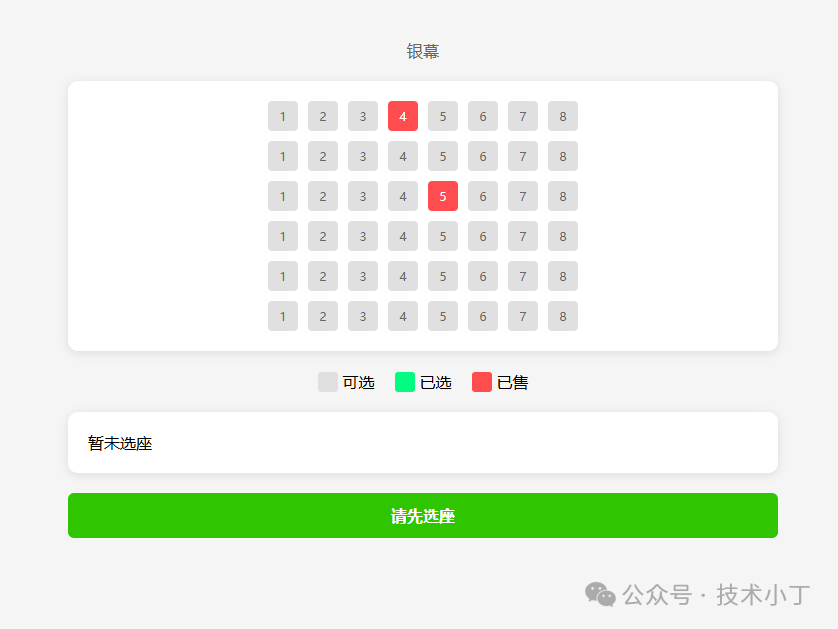
在现代在线票务系统中,可视化选座功能是提升用户体验的重要组成部分。用户可以在购票过程中直观地查看座位布局,选择心仪的座位,这种交互方式大大提高了用户的参与感和满意度。本文将详细介绍如何使用 HTML、CSS 和 JavaScript 构建一个影院选座系统。效果演示
本系统实现了典型的影院选座界面。用户可以通过点击座位来选择或取消选择,系统会实时更新选座信息和总价。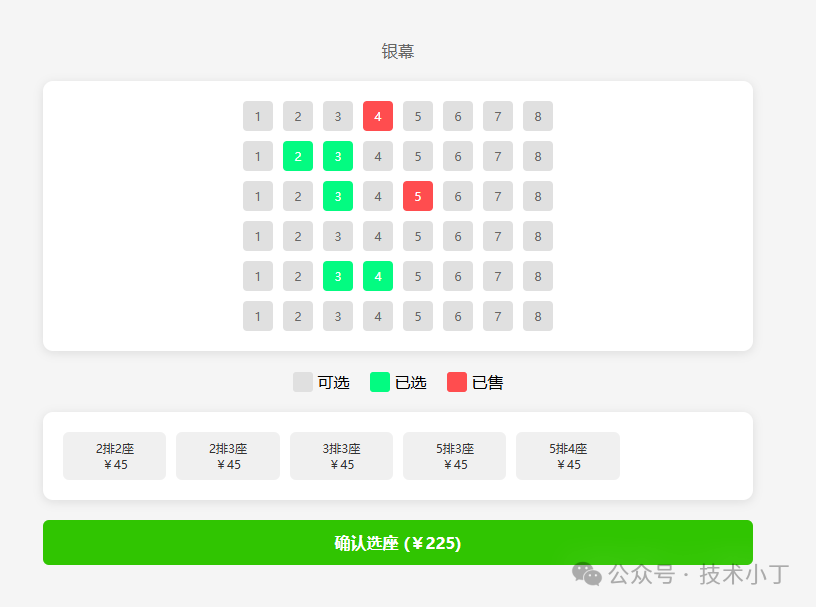
页面结构
页面从上到下主要包括以下几个功能区域:座位展示区(seat-map)、状态说明区(status)、选座信息区(selected-info)。
座位展示区
座位展示区位于页面中央,采用网格布局展示所有座位。每个座位用一个小方块表示,不同颜色代表不同状态(可选、已选、已售)。<div class="seat-map" id="seat-map"></div>
状态说明区
状态说明区展示了座位的不同状态及其对应的颜色标识,帮助用户快速识别座位状态。<div class="status"> <div class="status-item"> <div class="status-color available"></div> <span>可选</span> </div> <div class="status-item"> <div class="status-color selected"></div> <span>已选</span> </div> <div class="status-item"> <div class="status-color sold"></div> <span>已售</span> </div></div>
选座信息区
选座信息区展示用户已经选择的座位信息及总价格,实时更新选座状态。<div class="selected-info"> <div id="selected-seats">暂未选座</div></div>
核心功能实现
数据结构设计
系统使用二维数组 seatData 来表示座位布局,其中1表示可选座位,0表示已售座位。const seatData = [ [1, 1, 1, 0, 1, 1, 1, 1], [1, 1, 1, 1, 1, 1, 1, 1], [1, 1, 1, 1, 0, 1, 1, 1], [1, 1, 1, 1, 1, 1, 1, 1], [1, 1, 1, 1, 1, 1, 1, 1], [1, 1, 1, 1, 1, 1, 1, 1],];
座位初始化
initSeatMap 函数负责根据座位数据生成可视化的座位布局。该函数遍历座位数据,为每个座位创建DOM元素,并根据座位状态设置相应的CSS类和数据属性。function initSeatMap() { seatData.forEach((row, rowIndex) => { const rowDiv = document.createElement('div'); rowDiv.className = 'seat-row'; for (let i = 0; i < row.length; i++) { const seat = document.createElement('div'); seat.className = row[i] === 0 ? 'seat sold' : 'seat available'; seat.textContent = i+1; seat.dataset.row = rowIndex + 1; seat.dataset.number = i+1; seat.dataset.status = row[i]; rowDiv.appendChild(seat); } seatMapElem.appendChild(rowDiv); });}
选座交互处理
通过事件委托机制处理座位点击事件,实现座位状态切换。当用户点击座位时,系统会检查座位是否可选,如果是则切换其状态,并更新选座信息。seatMapElem.addEventListener('click', (e) => { const seat = e.target.closest('.seat'); if (!seat || seat.classList.contains('sold')) return;
const currentStatus = seat.dataset.status; if (currentStatus === '1') { seat.classList.remove('available'); seat.classList.add('selected'); seat.dataset.status = '2'; } else { seat.classList.remove('selected'); seat.classList.add('available'); seat.dataset.status = '1'; } updateSelectedInfo();});
选座信息更新
updateSelectedInfo 函数负责更新已选座位信息和总价显示。每当座位状态发生变化时,此函数会重新收集所有已选座位信息,更新显示内容和总价。function updateSelectedInfo() { const selected = document.querySelectorAll('#seat-map .selected'); const seatsList = Array.from(selected).map(seat => ({ row: seat.dataset.row, number: seat.dataset.number }));
const selectedSeatsElem = document.getElementById('selected-seats'); selectedSeatsElem.innerHTML = '';
if (seatsList.length === 0) { selectedSeatsElem.textContent = '暂未选座'; } else { seatsList.forEach(seat => { const seatDiv = document.createElement('div'); seatDiv.className = 'selected-seat-item'; seatDiv.innerHTML = `<span>${seat.row}排${seat.number}座</span> <span>¥${pricePerSeat}</span> `; selectedSeatsElem.appendChild(seatDiv); }); }
const totalPrice = selected.length * pricePerSeat; const btnElem = document.getElementById('btn'); btnElem.textContent = selected.length > 0 ? `确认选座 (¥${totalPrice})` : '请先选座';}
扩展建议
完整代码
git地址:https://gitee.com/ironpro/hjdemo/blob/master/seat-select/index.html<!DOCTYPE html><html lang="zh-CN"><head> <meta charset="UTF-8"> <meta name="viewport" content="width=device-width, initial-scale=1.0"> <title>影院选座</title> <style> * { margin: 0; padding: 0; box-sizing: border-box; }
body { background: #f5f5f5; }
.container { max-width: 750px; margin: 0 auto; padding: 20px; }
.screen { text-align: center; margin: 20px 0; color: #666; }
.seat-map { display: grid; gap: 10px; justify-content: center; background: white; padding: 20px; border-radius: 10px; box-shadow: 0 2px 10px rgba(0,0,0,0.1); }
.seat-row { display: flex; gap: 10px; align-items: center; }
.seat { width: 30px; height: 30px; border-radius: 4px; display: flex; align-items: center; justify-content: center; font-size: 14px; cursor: pointer; transition: all 0.2s; }
.status-color.available, .seat.available { background: #e0e0e0; color: #666; }
.status-color.selected, .seat.selected { background: #03fb81; color: white; }
.status-color.sold, .seat.sold { background: #ff4d4f; color: white; cursor: not-allowed; }
.status { display: flex; gap: 20px; justify-content: center; margin: 20px 0; }
.status-item { display: flex; align-items: center; gap: 5px; }
.status-color { width: 20px; height: 20px; border-radius: 3px; } .selected-info { background: white; padding: 20px; border-radius: 10px; box-shadow: 0 2px 10px rgba(0,0,0,0.1); max-width: 750px; margin: 0 auto; } #selected-seats { display: grid; grid-template-columns: repeat(auto-fill, minmax(100px, 1fr)); gap: 10px; }
.selected-seat-item { background-color: #f0f0f0; border-radius: 6px; padding: 8px; text-align: center; font-size: 14px; color: #333; display: flex; flex-direction: column; justify-content: center; align-items: center; } .btn { max-width: 750px; margin: 20px auto; padding: 14px; text-align: center; background-color: #30c501; color: white; font-weight: bold; border-radius: 6px; cursor: pointer; transition: background-color 0.2s ease; }
.btn:hover { background-color: #02d66d; }
.btn:disabled { background-color: #ccc; cursor: not-allowed; } </style></head><body><div class="container"> <div class="screen">银幕</div> <div class="seat-map" id="seat-map"></div>
<div class="status"> <div class="status-item"> <div class="status-color available"></div> <span>可选</span> </div> <div class="status-item"> <div class="status-color selected"></div> <span>已选</span> </div> <div class="status-item"> <div class="status-color sold"></div> <span>已售</span> </div> </div>
<div class="selected-info"> <div id="selected-seats">暂未选座</div> </div> <div> <div class="btn" id="btn">请先选座</div> </div></div>
<script> const pricePerSeat = 45; const seatData = [ [1, 1, 1, 0, 1, 1, 1, 1], [1, 1, 1, 1, 1, 1, 1, 1], [1, 1, 1, 1, 0, 1, 1, 1], [1, 1, 1, 1, 1, 1, 1, 1], [1, 1, 1, 1, 1, 1, 1, 1], [1, 1, 1, 1, 1, 1, 1, 1], ];
const seatMapElem = document.getElementById('seat-map');
seatMapElem.addEventListener('click', (e) => { const seat = e.target.closest('.seat'); if (!seat || seat.classList.contains('sold')) return;
const currentStatus = seat.dataset.status; if (currentStatus === '1') { seat.classList.remove('available'); seat.classList.add('selected'); seat.dataset.status = '2'; } else { seat.classList.remove('selected'); seat.classList.add('available'); seat.dataset.status = '1'; }
updateSelectedInfo(); });
function initSeatMap() { seatData.forEach((row, rowIndex) => { const rowDiv = document.createElement('div'); rowDiv.className = 'seat-row'; for (let i = 0; i < row.length; i++) { const seat = document.createElement('div'); seat.className = row[i] === 0 ? 'seat sold' : 'seat available'; seat.textContent = i+1; seat.dataset.row = rowIndex + 1; seat.dataset.number = i+1; seat.dataset.status = row[i]; rowDiv.appendChild(seat); } seatMapElem.appendChild(rowDiv); }); }
function updateSelectedInfo() { const selected = document.querySelectorAll('#seat-map .selected'); const seatsList = Array.from(selected).map(seat => ({ row: seat.dataset.row, number: seat.dataset.number }));
const selectedSeatsElem = document.getElementById('selected-seats'); selectedSeatsElem.innerHTML = '';
if (seatsList.length === 0) { selectedSeatsElem.textContent = '暂未选座'; } else { seatsList.forEach(seat => { const seatDiv = document.createElement('div'); seatDiv.className = 'selected-seat-item'; seatDiv.innerHTML = `<span>${seat.row}排${seat.number}座</span> <span>¥${pricePerSeat}</span> `; selectedSeatsElem.appendChild(seatDiv); }); }
const totalPrice = selected.length * pricePerSeat; const btnElem = document.getElementById('btn'); btnElem.textContent = selected.length > 0 ? `确认选座 (¥${totalPrice})` : '请先选座'; }
initSeatMap();</script></body></html>
阅读原文:原文链接
该文章在 2025/12/15 9:09:36 编辑过





 400 186 1886