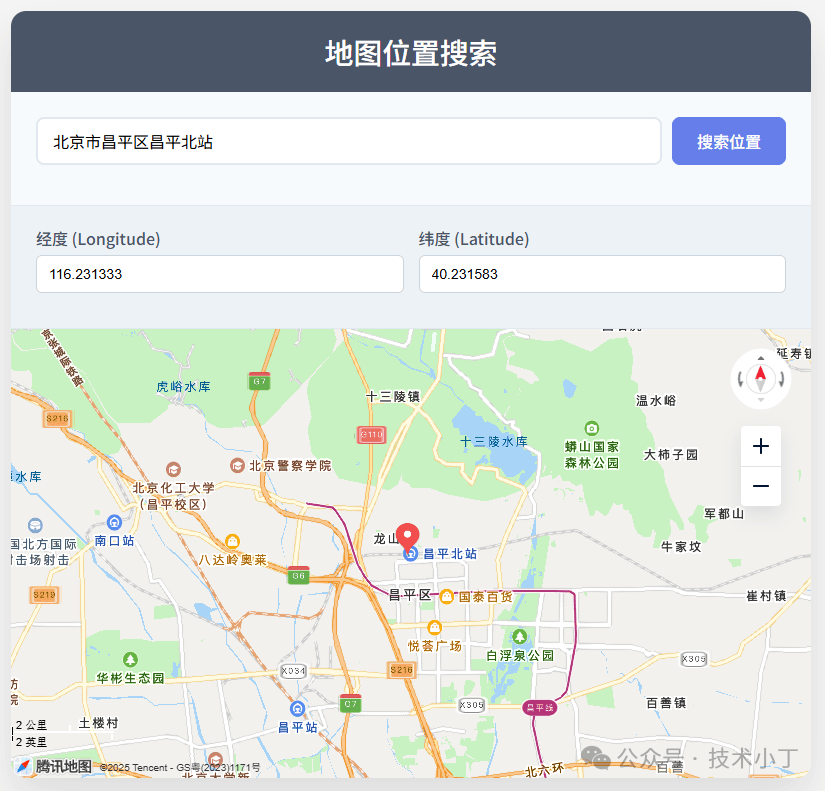
地理位置服务在当今的互联网应用中扮演着重要角色,无论是电商配送、出行导航还是本地生活服务,都需要准确的位置信息支持。本文将介绍如何使用 HTML、CSS 和 JavaScript 结合腾讯地图 API 实现一个简单易用的地图位置搜索功能,帮助用户快速查找地理位置并获取其经纬度坐标。效果演示
本系统提供简洁直观的用户界面,主要包括地址搜索输入框、坐标结果显示区域和地图展示区域。用户只需在搜索框中输入地址关键词,点击搜索按钮即可在地图上定位该位置,并同时显示其经纬度坐标。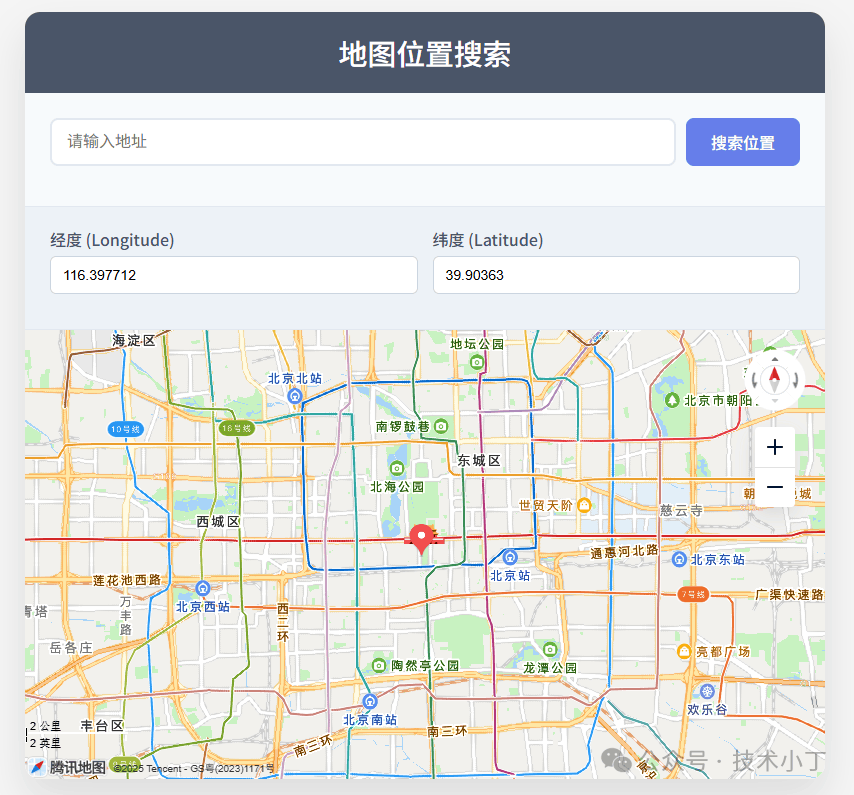
页面结构
页面包含以下几个主要区域:搜索区域、坐标显示区域、地图展示区域。
搜索区域
搜索区域位于页面顶部,包含地址输入框和搜索按钮,是用户与系统交互的主要入口。<div class="search-section"> <div class="search-group"> <input type="text" placeholder="请输入地址" id="address"> <button id="search_map">搜索位置</button> </div></div>
坐标显示区域
坐标显示区域位于搜索区域下方,用于展示当前位置的经纬度信息。<div class="result-section"> <div class="coordinates"> <div class="coordinate-input"> <label for="lng">经度 (Longitude)</label> <input type="text" id="lng" name="lng" readonly> </div> <div class="coordinate-input"> <label for="lat">纬度 (Latitude)</label> <input type="text" id="lat" name="lat" readonly> </div> </div></div>
地图展示区域
地图展示区域占据页面大部分空间,用于可视化显示地图和位置标记。<div class="map-container" id="map-container"></div>
核心功能实现
引入腾讯地图
通过 script 标签引入腾讯地图 JavaScript API,用于在网页中加载地图功能库。your_key 是腾讯地图API的开发者密钥占位符,实际使用时需要替换为真实的API密钥。<script src="https://map.qq.com/api/gljs?v=1.exp&key=your_key&libraries=service"></script>
地图初始化
使用 initMap 函数初始化地图。设置默认中心点和缩放级别,创建一个标记图层并绑定到地图上,绑定地图的点击事件,初始化坐标显示。function initMap(lat = 39.903630, lng = 116.397712) { var center = new TMap.LatLng(lat, lng) map = new TMap.Map(document.getElementById('map-container'), { center: center, zoom: 12, }); markerLayer = new TMap.MultiMarker({ map: map, styles: { "myStyle": new TMap.MarkerStyle({ "width": 25, "height": 35, "anchor": { x: 16, y: 32 } }) }, geometries: [{ "id": "1", "styleId": 'myStyle', "position": new TMap.LatLng(lat, lng), }] }); map.on("click",clickHandler) document.getElementById('lat').value = lat; document.getElementById('lng').value = lng;}
地址搜索功能
通过腾讯地图的地理编码服务,将用户输入的地址转换为具体的经纬度坐标,在地图上标记该位置,并将地图的中心点设置为该位置。function searchMap(address) { var geocoder = new TMap.service.Geocoder(); geocoder.getLocation({address:address}).then((res)=>{ if (res.status != 0) { console.log('获取经纬度错误:',res); return; } changeCoordinate(res.result.location.lat,res.result.location.lng); map.setCenter(new TMap.LatLng(res.result.location.lat,res.result.location.lng)); }).catch((res)=>{ console.log('获取经纬度错误:',res) })}
地图交互功能
用户可以直接点击地图上的任意位置,系统会自动更新标记位置并显示新的经纬度坐标。function clickHandler (e) { var lat = e.latLng.getLat().toFixed(6); var lng = e.latLng.getLng().toFixed(6); changeCoordinate(lat,lng);}
function changeCoordinate(lat,lng){ markerLayer.updateGeometries([ { "id": "1", "styleId":"myStyle", "position": new TMap.LatLng(lat, lng), } ]) document.getElementById('lng').value = lng; document.getElementById('lat').value = lat;}
完整代码
git地址:https://gitee.com/ironpro/hjdemo/blob/master/map-search/index.html
注意:在当前代码中,your_key 为占位符,实际运行时必须替换为有效的腾讯地图 API 密钥才能正常使用地图功能。<!DOCTYPE html><html lang="zh-CN"><head> <meta charset="UTF-8"> <meta name="viewport" content="width=device-width, initial-scale=1.0"> <title>地图位置搜索</title> <style> * { margin: 0; padding: 0; box-sizing: border-box; }
body { background-color: #f5f5f5; min-height: 100vh; padding: 20px; }
.container { max-width: 800px; margin: 0 auto; background: white; border-radius: 15px; box-shadow: 0 20px 40px rgba(0,0,0,0.1); overflow: hidden; }
.header { background: #4a5568; color: white; padding: 20px; text-align: center; }
.header h1 { font-size: 1.8rem; font-weight: 500; }
.search-section { padding: 25px; background: #f7fafc; border-bottom: 1px solid #e2e8f0; }
.search-group { display: flex; gap: 10px; margin-bottom: 15px; }
#address { flex: 1; padding: 14px 15px; border: 2px solid #e2e8f0; border-radius: 8px; font-size: 16px; transition: border-color 0.3s; }
#address:focus { outline: none; border-color: #667eea; }
#search_map { padding: 14px 25px; background: #667eea; color: white; border: none; border-radius: 8px; cursor: pointer; font-size: 16px; font-weight: 500; transition: background 0.3s; }
#search_map:hover { background: #5a67d8; }
.result-section { padding: 20px 25px; background: #edf2f7; }
.coordinates { display: flex; gap: 15px; margin-bottom: 15px; }
.coordinate-input { flex: 1; }
.coordinate-input label { display: block; margin-bottom: 5px; font-weight: 500; color: #4a5568; }
.coordinate-input input { width: 100%; padding: 10px 14px; border: 1px solid #cbd5e0; border-radius: 6px; font-size: 14px; }
.map-container { width: 100%; height: 450px; border-top: 1px solid #e2e8f0; }
.location-info { padding: 15px 25px; background: #fff; border-top: 1px solid #e2e8f0; font-size: 14px; color: #4a5568; }
.location-info span { font-weight: 600; color: #2d3748; } </style></head><body><div class="container"> <div class="header"> <h1>地图位置搜索</h1> </div>
<div class="search-section"> <div class="search-group"> <input type="text" placeholder="请输入地址" id="address"> <button id="search_map">搜索位置</button> </div> </div>
<div class="result-section"> <div class="coordinates"> <div class="coordinate-input"> <label for="lng">经度 (Longitude)</label> <input type="text" id="lng" name="lng" readonly> </div> <div class="coordinate-input"> <label for="lat">纬度 (Latitude)</label> <input type="text" id="lat" name="lat" readonly> </div> </div> </div> <div class="map-container" id="map-container"></div></div>
<script src="https://map.qq.com/api/gljs?v=1.exp&key=your_key&libraries=service"></script><script> var map; var markerLayer; var search_map = document.getElementById('search_map');
search_map.addEventListener('click', function () { var address = document.getElementById('address').value; if (address) { searchMap(address) } })
function initMap(lat = 39.903630, lng = 116.397712) { var center = new TMap.LatLng(lat, lng) map = new TMap.Map(document.getElementById('map-container'), { center: center, zoom: 12, }); markerLayer = new TMap.MultiMarker({ map: map, styles: { "myStyle": new TMap.MarkerStyle({ "width": 25, "height": 35, "anchor": { x: 16, y: 32 } }) }, geometries: [{ "id": "1", "styleId": 'myStyle', "position": new TMap.LatLng(lat, lng), }] }); map.on("click",clickHandler) document.getElementById('lat').value = lat; document.getElementById('lng').value = lng; } function clickHandler (e) { var lat = e.latLng.getLat().toFixed(6); var lng = e.latLng.getLng().toFixed(6); changeCoordinate(lat,lng); } function searchMap(address) { var geocoder = new TMap.service.Geocoder(); geocoder.getLocation({address:address}).then((res)=>{ if (res.status != 0) { console.log('获取经纬度错误:',res); return; } changeCoordinate(res.result.location.lat,res.result.location.lng); map.setCenter(new TMap.LatLng(res.result.location.lat,res.result.location.lng)); }).catch((res)=>{ console.log('获取经纬度错误:',res) }) } function changeCoordinate(lat,lng){ markerLayer.updateGeometries([ { "id": "1", "styleId":"myStyle", "position": new TMap.LatLng(lat, lng), } ]) document.getElementById('lng').value = lng; document.getElementById('lat').value = lat; } initMap()</script></body></html>
阅读原文:原文链接
该文章在 2025/12/15 9:10:06 编辑过





 400 186 1886